Forum Discussion

how to make a chart that separates total data by month/year
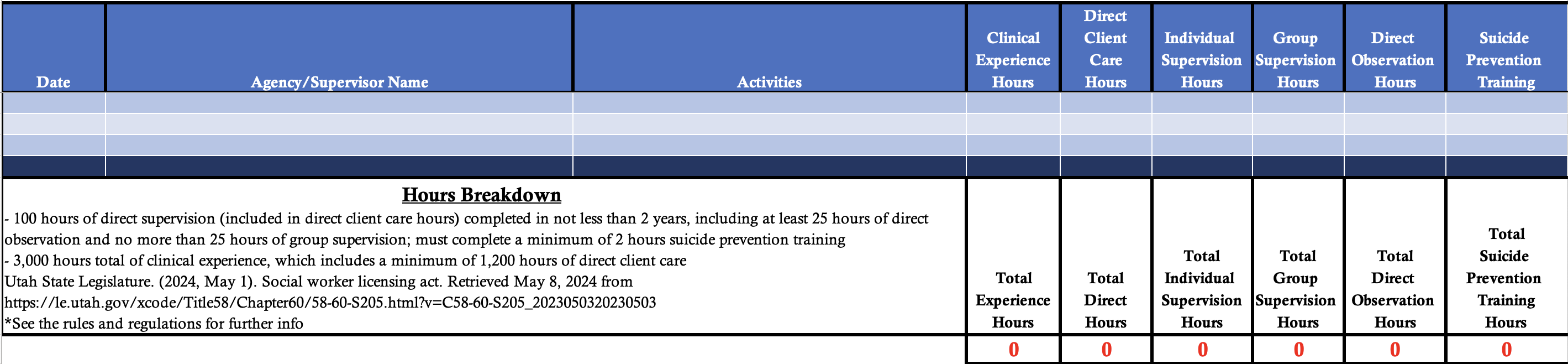
I've attached a picture of the hours that are calculated in my spreadsheet (clinical, direct care, individual supervision, group supervision, direct observation and training hours.) I need to total each of the columns by month/year in a separate chart. I don't have any data entered in the spreadsheet yet and will need the totals automatically added to the other chart as they're entered. Can someone help me with how this chart might look and what formulas I would use? The clinical hours will be totaled for about 2 years. Thanks in advance!
6 Replies
- mathetesGold Contributor
I need to total each of the columns by month/year in a separate chart. I don't have any data entered in the spreadsheet yet and will need the totals automatically added to the other chart as they're entered. Can someone help me with how this chart might look and what formulas I would use? The clinical hours will be totaled for about 2 years.
Without an idea of how the raw data is to be collected, it's rather difficult to tell you the definitive way to do it, what formula(s) to use.... In Excel there are often multiple ways to get from A to B.
However, based on the image, I'd suggest you acquaint yourself with the Pivot Table method. No formulas are needed, just an appropriate table with all of the relevant data (including dates). There are also myriad YouTube videos on Pivot Tables.
Finally, when you do get some data collected--or even a reasonably sized sampling of what the data might look like over a period of, say, six months, come back and post a copy of that workbook. Not an image, but the actual workbook. That will give us something to work with.
 smithl8686Copper Contributor
mathetesThanks so much for your response! The pivot table is actually perfect BUT I need it to separate by months and years. Right now, I have data from October 2023 and October 2024...I need them to be separate. Can you tell me how to add the year into the pivot table as well?
- mathetesGold Contributor
smithl8686 A screen shot is almost useless when compared to the actual workbook, especially when you've collapsed however many rows of dates you have. So I have to ask, do you have lots of dates, and will you have lots more? For example, right now, do you not have data from more 2023 and 2024 months? Add it to your database and see how Excel responds in that set of Pivot Table Fields. My experience is that it will usually offer to "stack" years and months, the latter as a subordinate level. You can force it to be more explicit by adding a column that contains nothing but year (which can be calculated by =YEAR(date) where date is the cell reference to an Excel date, but usually Excel can figure that out on its own.