Forum Discussion

mallela_hari_krishna
Jul 06, 2022Copper Contributor
How to maintain patient medical records to generate reports
Guidance is required in maintaining patient records for generating reports on the basis of diagnosis to list out the patients suffering from the same disease and medication prescribed .so that we can...
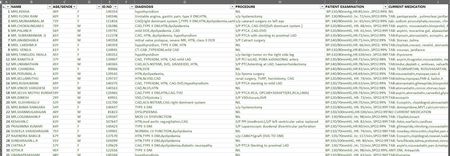
- Jul 06, 2022
Thanks for providing some data. No idea what kind of report you actually expect...
One with Power Query then Pivot Table:

mallela_hari_krishna
Jul 06, 2022Copper Contributor
Thanks, Dear!
This is the report I would like to generate. Still, I want to create a count of patients suffering from each disease and record the medication separately for each diagnosis, for that is how I need to maintain the template.
If I do so it will be helpful for creating a dashboard of patient diagnosis reports which presents procedures initiated from the diagnosis stage to the Cure of the disease. I'm having large data the data presented above is from 3 days and I need to consolidate the monthly data. I would like to automate the process of generating reports with less clerical work.
Your Inputs are so valuable to me.
This is the report I would like to generate. Still, I want to create a count of patients suffering from each disease and record the medication separately for each diagnosis, for that is how I need to maintain the template.
If I do so it will be helpful for creating a dashboard of patient diagnosis reports which presents procedures initiated from the diagnosis stage to the Cure of the disease. I'm having large data the data presented above is from 3 days and I need to consolidate the monthly data. I would like to automate the process of generating reports with less clerical work.
Your Inputs are so valuable to me.

Lorenzo
Jul 07, 2022Silver Contributor
In response to your email "Can you please do a list of applied steps power query... Kindly narrate to me how you have extracted the data"
I'm afraid it's not realistic to explain everything in details. To help you I looked at doing it with the Power Query User Interface only giving each step a meaningful name. Then edited the query code with the Advanced Editor to add some break lines (for readability only) and comments (begin with //) above almost each step:
let
    Source = Excel.CurrentWorkbook(){[Name="Table1"]}[Content],
    SelectedRequiredColumnsOnly = Table.SelectColumns(Source,{"NAME", "DIAGNOSIS", "CURRENT MEDICATION"}),

    // Inconsistent delimiters exist in DIAGNOSIS & CURRENT MEDICATION
    // Sometimes comma only, sometimes comma+space, sometimes space+comma
    ReplacedCommaSpaceWithComma = Table.ReplaceValue(SelectedRequiredColumnsOnly,", ",",",Replacer.ReplaceText,{"DIAGNOSIS","CURRENT MEDICATION"}),
    ReplacedSpaceCommaWithComma = Table.ReplaceValue(ReplacedCommaSpaceWithComma," ,",",",Replacer.ReplaceText,{"DIAGNOSIS", "CURRENT MEDICATION"}),

    // Some DIAGNOSIS & CURRENT MEDIATIONS have trailing spaces
    RemovedTrailingSpaces = Table.TransformColumns(ReplacedSpaceCommaWithComma,
        {{"DIAGNOSIS", Text.Trim, type text}, {"CURRENT MEDICATION", Text.Trim, type text}}
    ),

    // Don't try to understand this step, part of it isn't documented
    SplitDiagnosisToRows = Table.ExpandListColumn(
        Table.TransformColumns(RemovedTrailingSpaces,
            {{"DIAGNOSIS", Splitter.SplitTextByDelimiter(",", QuoteStyle.Csv), let itemType = (type nullable text) meta [Serialized.Text = true] in type {itemType}}}
        ), "DIAGNOSIS"
    ),

    // Some DIAGNOSIS have a comma at the end of the string
    // ==> After spliting DIAGNOSIS we get extra (blank) rows
    FilteredOutBlankDiagnosis = Table.SelectRows(SplitDiagnosisToRows, each ([DIAGNOSIS] <> "")),

    // Some CURRENT MEDICATION starts with "TAB:", others with "tab:"
    // Power Query is case sensitive. Using Comparer.OrdinalIgnoreCase "TAB:" = "tab:"
    // if CURRENT MEDICATION begins with "tab:"
    // then take the first 4 char. of CURRENT MEDICATION
    // else return a 'null' value
    IsolatedTabPrefix = Table.AddColumn(FilteredOutBlankDiagnosis, "MEDICATION_PREFIX", each
        if Text.StartsWith([CURRENT MEDICATION], "tab:", Comparer.OrdinalIgnoreCase)
        then Text.Start([CURRENT MEDICATION], 4)
        else null
    ),

    // Get the actual MEDICATION
    // If MEDICATION_PREFIX = 'null' (there's no "tab:" / "TAB:" prefix) in CURRENT MEDICATION
    // then take CURRENT MEDICATION
    // else take CURRENT MEDICATION after MEDICATION_PREFIX
    ActualMedication = Table.AddColumn(IsolatedTabPrefix, "MEDICATION", each
        if [MEDICATION_PREFIX] = null
        then [CURRENT MEDICATION]
        else Text.AfterDelimiter([CURRENT MEDICATION],[MEDICATION_PREFIX])
    ),
    // Columns no more required ==> Remove them
    RemovedColumns = Table.RemoveColumns(ActualMedication,{"CURRENT MEDICATION", "MEDICATION_PREFIX"}),

    // Some MEDICATION begin with TAB:<space>, others with TAB: without a space after
    TrimmedTrailingSpacesAgain = Table.TransformColumns(RemovedColumns,{{"MEDICATION", Text.Trim, type text}}),

    // Again, don't try to understand this step, part of it isn't documented
    SplitMedicationToRows = Table.ExpandListColumn(
        Table.TransformColumns(TrimmedTrailingSpacesAgain,
            {{"MEDICATION", Splitter.SplitTextByDelimiter(",", QuoteStyle.Csv), let itemType = (type nullable text) meta [Serialized.Text = true] in type {itemType}}}
        ), "MEDICATION"
    ),

    // Some MEDICATION have a comma at the end of the string
    // ==> After spliting MEDICATION we get extra (blank) rows
    FilteredOutBlankMedication = Table.SelectRows(SplitMedicationToRows, each ([MEDICATION] <> ""))
in
    FilteredOutBlankMedication
Same result in Power Pivot Table:
If you want to understand exactly what each Power Query function does, the documentation is available here
Hope this helps