Forum Discussion

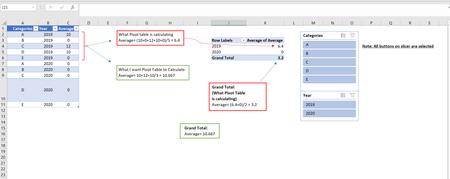
How to let Pivot Table ignore ZEROs from the data while calculating Average and Average of Average?
- Apr 08, 2021


SergeiBaklan Thank you so much! This WORKS exactly like I wanted.
However, I am trying to understand the logic for the formula:
| Category | Value |
A | 101 |
| A | 102 |
| A | 0 |
| A | 104 |
| A | 0 |
| B | 106 |
| B | 107 |
| B | 0 |
| B | 109 |
=CALCULATE(AVERAGE(Table1[Value]),Table1[Value]<>0)
According to my understanding when we expand the logic:
For Category B:
Average((106,107,0,109),(106,107,109))
=92???
Whereas, excel calculates it correctly like I wanted : AVERAGE(106,107,109) = 107.33
- SergeiBaklanApr 11, 2021Diamond Contributor
CALCULATE() function evaluates the expresion defined by first parameter AVERAGE(Table1[Value]) in filter context defined by other patameters. Thus we apply to our current context (e.g. table which has all values for Category B if we are within B row of PivotTable) additional filter contexts Table1[Value]<>0, i.e. for category B return all rows for which Value is not equal to zero. Result is {106,107,109} which we average.
- rahulvadhvaniaApr 12, 2021Copper ContributorGreat. Thanks for the explanation.