Forum Discussion

How to input data into different cells from one table
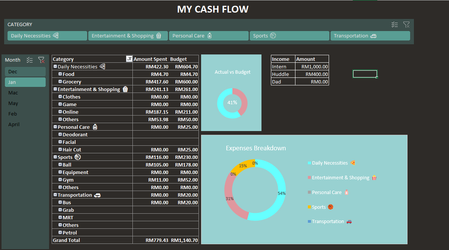

You've had a lot of views, no replies. I suspect that lack of responses is due to the difficulty in understanding how your workbook is arranged, what all the tabs are, how the raw data (presumably transactional) is entered in the first place.
In other words, in general
How is Input handled?
Are you collecting raw transactional data on separate tabs based on sub-categories?
Or are you collecting all raw transactional data on a single sheet, as a single database?
How is Output handled?
Are you in a position to post your actual workbook (or a copy of it) on OneDrive or GoogleDrive, pasting a link here that grants edit access. That would help us help you.
For what it's worth, my own approach with my own expense tracking workbook is to collect all raw data (Input) on a single worksheet, as a single table. All data meaning every credit card charge/payment, every check written, every deposit made. I then have three columns for budget category, sub-category, and (optionally) sub-sub-category. I then use Excel's marvelous Pivot Table capability to create summary Output) reports of income and expense by month by category. Personally, I don't bother with graphs, though they'd be easy enough to do, from the Pivot Table.