Forum Discussion

sbmln
Dec 13, 2023Tin Contributor
How to get Running and Reducing Total at Once
In this given snap, I used the increasing/decreasing range inside SUMIFS to get the result I wanted. I need to drag down the range below, but how can we perform using spillover functionality...
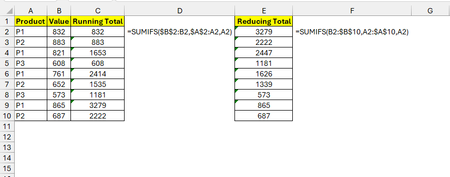
 Dec 19, 2023=MAP($A$2:$A$10,B2:B10,LAMBDA(a,b,SUMIFS(B10:b,A10:a,a)))
=MAP($A$2:$A$10,B2:B10,LAMBDA(a,b,SUMIFS(B2:b,A2:a,a)))

Lorenzo
Dec 19, 2023Silver Contributor
There's always one to ask for something 🙂
FYI there was a potential #CALC! issue in what I posted the other day
sbmln
Dec 19, 2023Tin Contributor
Nice to see your solution, although I also got a solution with MAP function.
For Running total
=MAP($A$2:$A$10,B2:B10,LAMBDA(a,b,SUMIFS(B2:b,A2:a,a)))
For Reducing total
=MAP($A$2:$A$10,B2:B10,LAMBDA(a,b,SUMIFS(B10:b,A10:a,a)))
For Running total
=MAP($A$2:$A$10,B2:B10,LAMBDA(a,b,SUMIFS(B2:b,A2:a,a)))
For Reducing total
=MAP($A$2:$A$10,B2:B10,LAMBDA(a,b,SUMIFS(B10:b,A10:a,a)))
- LorenzoDec 19, 2023Silver Contributor
Interesting. This doesn't seem to scale very well though
In attached file a range of 50k rows with 51 Products. In D2 your MAP formula for Running Total, in K2 what I suggested the other day. I let you try and see if MAP remains the best option for your scenario...