Forum Discussion

sbmln
Dec 13, 2023Tin Contributor
How to get Running and Reducing Total at Once
In this given snap, I used the increasing/decreasing range inside SUMIFS to get the result I wanted. I need to drag down the range below, but how can we perform using spillover functionality...
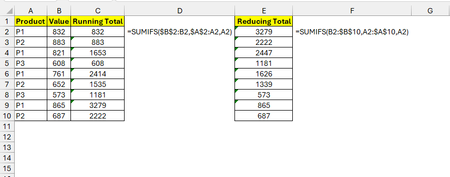
 Dec 19, 2023=MAP($A$2:$A$10,B2:B10,LAMBDA(a,b,SUMIFS(B10:b,A10:a,a)))
=MAP($A$2:$A$10,B2:B10,LAMBDA(a,b,SUMIFS(B2:b,A2:a,a)))

Riny_van_Eekelen
Dec 14, 2023Platinum Contributor
sbmln Consider using a structured Excel table with structured references. enter the formula in the first cell of the RT column. Press enter and it will copy itself down the entire column (i.e. not equal to spilling!) automatically. And when the table grows longer, the formula will 'grow' with it. Example in the attached file.
- sbmlnDec 14, 2023Tin ContributorExcellent !
But how to get the result without using table, running total and reducing total both.- Riny_van_EekelenDec 14, 2023Platinum Contributor
sbmln I'll gladly leave that to those who are much quicker than me constructing the required "all-in-one" dynamic array formula for this. Not really able to spend too much time on myself right now. Sorry.