Forum Discussion

How to get row data if matching specific column criteria
- Dec 08, 2020
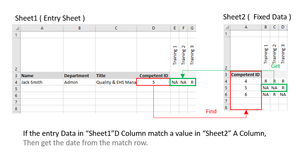
FaisalExcell See a mock-up of your schedule attached, offering three different approaches. VLOOKUP, XLOOKUP and INDEX/MATCH.

Hey Riny_van_Eekelen i promise this will be my last 😄
in the Employee Profile tab I'm trying to get the confirmation date from Employee Training Matrix, i managed by luck to get the requirement need but when i applied the same used formula to the date i get #VALUE

FaisalExcell In the last part of the formula ('Employee Training Matrix'!F6:KS164)), you should change the first cell in the return_array to F5 so that the size matched the size of the lookup_array.
- Riny_van_EekelenFeb 28, 2021Platinum Contributor
FaisalExcell Try this:
=IF(C9#="NA","--",TRANSPOSE(XLOOKUP(C4,'Employee Training Matrix'!A5:A164,'Employee Training Matrix'!F6:KS165))) - FaisalExcellFeb 28, 2021Copper Contributor
Riny_van_Eekelen Thanx Riny i have figured that out during the weekend.
=TRANSPOSE(XLOOKUP(C4,'Employee Training Matrix'!A5:A164,'Employee Training Matrix'!F6:KS165))but the empty cells are showing 0 when transposing, how can i add IF in middle of the formula to Show "--" if empty cells ?
- Riny_van_EekelenFeb 25, 2021Platinum Contributor
FaisalExcell Aha, I see. Try this one in stead:
=TRANSPOSE(XLOOKUP(C4,'Employee Training Matrix'!A5:A164,'Employee Training Matrix'!F6:KS165))The Lookup_array is in row 5:164 and return array in row 6:165. Still the same array size, but shifted one row between them.
- FaisalExcellFeb 25, 2021Copper Contributor
Hi Riny_van_Eekelen but that will get me the information of the requirement F5, i want to get the dates from F6.