Forum Discussion

How to delete multiple cells based off the value of a specific cell.
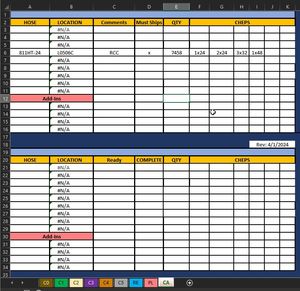
- Nov 25, 2024
In the desktop version of Excel for Windows or Mac:
Press Alt+F11 to activate the Visual Basic Editor
Double-click ThisWorkbook under Microsoft Excel objects in the Project Explorer pane on the left hand side.
Copy the following code into the ThisWorkbook module:
Private Sub Workbook_SheetChange(ByVal Sh As Object, ByVal Target As Range)
    Dim rng As Range
    Dim cel As Range
    Set rng = Intersect(Sh.Range("B:B"), Target)
    If Not rng Is Nothing Then
        Application.ScreenUpdating = False
        Application.EnableEvents = False
        For Each cel In rng
            If cel.Value = "" And cel.Offset(0, 1).HasFormula Then
                cel.Offset(0, 2).Resize(1, 9).ClearContents
            End If
        Next cel
        Application.EnableEvents = True
        Application.ScreenUpdating = True
    End If
End Sub
Switch back to Excel.
Save the workbook as a macro-enabled workbook (*.xlsm).
Make sure that you allow macros when you open it.

In the desktop version of Excel for Windows or Mac:
Press Alt+F11 to activate the Visual Basic Editor
Double-click ThisWorkbook under Microsoft Excel objects in the Project Explorer pane on the left hand side.
Copy the following code into the ThisWorkbook module:
Private Sub Workbook_SheetChange(ByVal Sh As Object, ByVal Target As Range)
    Dim rng As Range
    Dim cel As Range
    Set rng = Intersect(Sh.Range("B:B"), Target)
    If Not rng Is Nothing Then
        Application.ScreenUpdating = False
        Application.EnableEvents = False
        For Each cel In rng
            If cel.Value = "" And cel.Offset(0, 1).HasFormula Then
                cel.Offset(0, 2).Resize(1, 9).ClearContents
            End If
        Next cel
        Application.EnableEvents = True
        Application.ScreenUpdating = True
    End If
End Sub
Switch back to Excel.
Save the workbook as a macro-enabled workbook (*.xlsm).
Make sure that you allow macros when you open it.

It's odd. My replies don't show up. Anyways, changing "B:B" to "A:A" gave me the result I was looking for. Thank you!