Forum Discussion

dankello
Oct 10, 2023Copper Contributor
How to create a line chart from multiple Excel sheets
Hi, For student rewards (Bronze, Silver, Gold). I need to create a line chart which tracks progress over several weeks. Each week data is on a separate Excel sheet. I want the line chart to ...
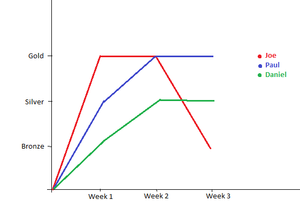
- Oct 10, 2023
- The y-values of a chart must be numeric. So change Bronze to 1, Silver to 2 and Gold to 3.
- However, you can use the custom number format [=1]"Bronze";[=2]"Silver";"Gold" to display them as Bronze, Silver and Gold.
- You'll have to create a new range to act as data source for the chart. In the attached example, I used VLOOKUP combined with INDIRECT to do this.

dankello
Oct 11, 2023Copper Contributor
HansVogelaar thank you. Is there a way to remove the vertical axis labels (0,1,2,3) and replace them with 4th Place, Bronze, Silver, Gold?

HansVogelaar
Oct 11, 2023MVP
It is possible, but it is rather complicated and tricky.
In the attached version, I added a dummy series with values 0.
I changed its chart type from Line to Clustered Bar.
I set the x-values for the bar chart to the descriptions Fourth Place etc.
I then hid the original y-axis and the new secondary x-axis.
I set the (vertical) x-axis of the bar chart to place the data on the tick marks.