Forum Discussion

Marc56
Feb 23, 2024Copper Contributor
How to count not empty cells and avoiding duplicates
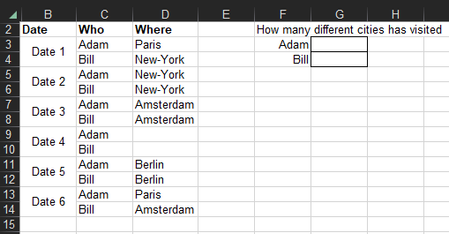
Hi, I have a problem to count how many different cells per person in a list, either I can count avoiding the duplicates but empty cells are a problem, or count avoiding empty cells and duplicates are...

djclements
Feb 23, 2024Silver Contributor
Marc56 Another option with Excel for MS365:
=LET(
    data, UNIQUE($C$3:$D$14),
    incl, (TAKE(data,, 1)=F3)*(TAKE(data,, -1)<>""),
    IF(OR(incl), ROWS(FILTER(data, incl)), 0)
)
Or, to spill the entire summary using a single cell array formula:
=LET(
    who, UNIQUE(C3:C14),
    data, UNIQUE(C3:D14),
    results, BYROW(who, LAMBDA(r, LET(
        incl, (TAKE(data,, 1)=r)*(TAKE(data,, -1)<>""),
        IF(OR(incl), ROWS(FILTER(data, incl)), 0)))),
    HSTACK(who, results)
)
Note: COUNTA with FILTER is incapable of returning 0 when no records are found... it will incorrectly return 1. The ROWS function will return #CALC! when no records are found, which can be handled with either the IFERROR function, or with the IF/OR method shown above to make sure at least one record was found before applying FILTER.
Distinct Count excluding blanks