Forum Discussion

brodskyfu
Oct 09, 2024Tin Contributor
How to conditional format in a dynamic spill?
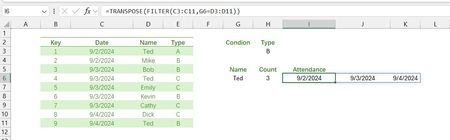
Hi, I want to spill a date list according to Name in a row (maybe Filter is not the best, any better formula?), and some color to format according Type condition. I tried many formulas in the rule bu...
- Oct 09, 2024
See the attached sample workbook. Select Conditional Formatting > Manage Rules... to see the rule that I created.

HansVogelaar
Oct 09, 2024MVP
Please explain in detail which colors you want for which conditions.

brodskyfu
Oct 09, 2024Tin Contributor
I want to show someone's attendance date list under a specific name, if that day's class type is B, for example, highlight color the regarding date in text or fill, color doesn't matter. I want to learn the way to do it. Tks~
- HansVogelaarOct 09, 2024MVP
See the attached sample workbook. Select Conditional Formatting > Manage Rules... to see the rule that I created.
- brodskyfuOct 09, 2024Tin Contributor
Dear buddy, I learn your way quite well, But why I can't use a table name to replace the locked range in the CF rule formula? I want to fresh with a table. Tks! I don't know where to upload file. sorry~
- HansVogelaarOct 10, 2024MVP
You can't refer to tables and parts of tables in a conditional formatting rule. Use the range reference instead. It will be updated automatically when you add rows to the table or remove them,
- brodskyfuOct 09, 2024Tin ContributorThank you buddy, art work totally!INDEX+MATCH isn't quite familiar with me, learn from you!♥