Forum Discussion

How to' Close Off' a month of data and store values for propserity
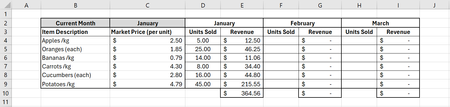

See the attached workbook. For security reasons, I moved the VBA code from the VBA Editor into a separate worksheet; you can easily review the code before installing it (to a standard code module), save the result to a macro-enabled workbook, and test it.
If you are planning to allow PMs to modify a macro-enabled worksheet, you have to consider security issues. (Don't discount the possibility that you may have a disgruntled PM in the future, or sophisticated invasive malware.) You probably need not be concerned about users viewing the code, but it needs to be protected from unauthorized changes.
You might apply VBA project security (but make sure any passwords are stored securely and are accessible to the company even if you get run over by a bus/kangaroo).
- a Stack Overflow discussion
- further discussion from a software company
- notes from the Australian government
And you want to make the resulting workbook "trusted" (such as placing it in a trusted directory), so users do not get inappropriately habituated to click "Enable macros" whenever such a warning appears.
It is possible to separate the code and the data into separate workbooks, but I'd rather take a nap than think about that.