Forum Discussion

How to check which date range an entered date falls between

OliverScheurich
Thanks so much for this fix. It works great!
Can you walk me through how this works?
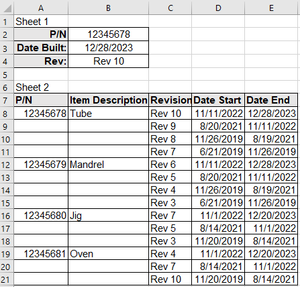
Also, is there a way to modify this formula so that if the Date Built isn't within a date range, or no part number is entered, the Rev field is blank instead of the current #Calc?
Really appreciate the help!

=LET(filldown,
SCAN("",A8:A21,LAMBDA(ini,arr,IF(arr<>"",arr,ini))),
revstartend,
FILTER(C8:E21,filldown=B2),
IFERROR( FILTER(CHOOSECOLS(revstartend,1),(CHOOSECOLS(revstartend,2)<=B3)*(CHOOSECOLS(revstartend,3)>=B3)) ,"")
)
You are welcome. You can wrap the last calculation (FILTER) within the LET function into IFERROR (highlighted in red) in order to return a blank cell if the Date Built doesn't exist in the date range or if no part number is entered.
In the screenshot you can see the results of filldown and revstartend from the LET function for the PN from cell B2.
In the last step the function
IFERROR(FILTER(CHOOSECOLS(revstartend,1),(CHOOSECOLS(revstartend,2)<=B3)*(CHOOSECOLS(revstartend,3)>=B3)),"")
filters the data from range I3:K5 with the date from cell B3 and returns the Rev. or an empty cell.
 spinaz007Dec 29, 2023Copper Contributor
Thanks again, that works great.
One last request. How can I make the ranges dynamic so that if they add more rows of data that the formula will still work?- OliverScheurichDec 29, 2023Gold Contributor
=LET(filldown,SCAN("",Tabelle9[PN],LAMBDA(ini,arr,IF(arr<>"",arr,ini))),
revstartend,FILTER(Tabelle9[[Revision]:[End]],filldown=B2),
IFERROR(FILTER(CHOOSECOLS(revstartend,1),(CHOOSECOLS(revstartend,2)<=B3)*(CHOOSECOLS(revstartend,3)>=B3)),""))You can work with a dynamic table. Tabelle9[PN] and Tabelle9[[Revision]:[End]] dynamically refer to the actual size of the dynamic table. Tabelle9 is the name of the dynamic table in my example. You have to replace Tabelle9 with the name of your dynamic table.
- spinaz007Dec 29, 2023Copper ContributorThanks!