Forum Discussion

How to change the filled color if gantt chart displays completed
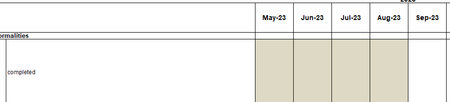

HansVogelaar I tried, but it didnt work out

Could you attach a small sample workbook demonstrating the problem (without sensitive data), or if that is not possible, make it available through OneDrive, Google Drive, Dropbox or similar? Thanks in advance.
- cchildaaJun 02, 2024Copper Contributorhttps://1drv.ms/f/s!AkiH05FJrWZykS4Nxw8a7fnzjGIf?e=tL7eWI
Please find the file from attached link for your reference.
Thanks for your help.- HansVogelaarJun 02, 2024MVP
Thanks. Your rule applies to I5:Z5 and its formula is
=AND(ISNUMBER(SEARCH("completed",C5)),AND(ISBLANK(D5)=FALSE, ISBLANK(E5)=FALSE, ISBLANK(F5)=FALSE, ISBLANK(G4)=FALSE, ISBLANK(H5)=FALSE, ISBLANK(I5)=FALSE, ISBLANK(J5)=FALSE, ISBLANK(K5)=FALSE, ISBLANK(L5)=FALSE, ISBLANK(M5)=FALSE, ISBLANK(N5)=FALSE, ISBLANK(O5)=FALSE, ISBLANK(P5)=FALSE, ISBLANK(Q5)=FALSE, ISBLANK(R5)=FALSE, ISBLANK(S5)=FALSE, ISBLANK(T5)=FALSE, ISBLANK(U5)=FALSE))
In the first place, for this to work, ALL column references should be absolute: $C5, $D5, $E5 etc.
In the second place, it requires that ALL cells in C5:U5 are filled (none of them is blank). Is that really what you want?
- cchildaaJun 04, 2024Copper Contributorthanks for your reply. It doesn’t work. I dont know why. 😭😭😭