Forum Discussion

Aladdin_Ajaj
Dec 28, 2022Copper Contributor
How I calculate two average fields in pivot table
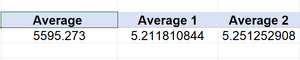
I'm trying to subtract two averages in pivot table using calculation filed option "average 2 - average 1" but the result comes out incorrect it's not the subtraction of both averages I change...
- Dec 28, 2022
This doesn't work the way you think it does :)) What happens is illustrated in K2:N4 below:
If, with the above Table1, you expect the diff. shown in I8:I9 AFAIK this isn't doable with a classic PivotTable but with Power Pivot assuming you run Excel >/=2013 on Windows


Riny_van_Eekelen
Dec 28, 2022Platinum Contributor
Aladdin_Ajaj That doesn't work within a regular pivot table. The result you see is merely the difference between the sum of the values of the two columns you used for the averages. Even when you set it to be an average.
With Power Pivot, however, you can write a few DAX measures for calculating averages and the variance between them.
A very simple example is included in the attached file.
 Aladdin_AjajDec 28, 2022Copper ContributorI didn't use power pivot before, I followed the steps in the excel file and it worked
Thank you for simplify the solution