Forum Discussion

How do we section dynamic arrays for running averages, running slopes or other functions?
- Jul 18, 2021
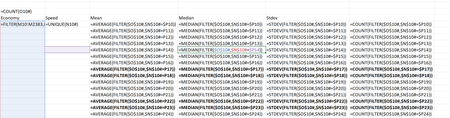
I have attached a couple of variations that may be of interest to you.
= LET(
  SpeedEcon, FILTER(Economy#,Speed#=@DistinctSpeed#),
  mean,      AVERAGE(SpeedEcon),
  median,    MEDIAN(SpeedEcon),
  stddev,    STDEV.S(SpeedEcon),
  count,     COUNT(SpeedEcon),
  CHOOSE({1,2,3,4}, mean, median, stddev, count) )
The first (green) performs the computationally intensive FILTER operation only once for each speed and outputs multiple statistical measures as an array.
The second (orange) is closer to providing the spilt ranges you were hoping to achieve, but median and standard deviation might require helper ranges.
= AVERAGEIFS(Economy#, Speed#, DistinctSpeed#)

= COUNTIFS(Speed#, DistinctSpeed#)

Hi Carlos
I agree with your decision to forego the idea of combining the distinct products and their median values in a single formula; it serves little purpose. I would probably have chosen the MAP function in preference to BYROW, merely because it is more specific to the task.
Something I have tried here, is to tidy up the worksheet formula, though at the expense of moving complexity elsewhere. I chose to define an appropriate Lambda function MEDIANIFλ, to have the same syntax as SUMIF. The final formula is
= MEDIANIFλ(Product, distinctProducts#, Values)which looks simple until you examine the definition of MEDIANIFλ
= LAMBDA(critRng,critVals,valRng,
    MAP(critVals,
      LAMBDA(aCritVal,
        MEDIAN(IF(critRng=aCritVal, valRng))
      )
    )
  )
It is still possible to combine the two columns, if one so chooses
= LET(
  distinctProducts, SORT(UNIQUE(Product)),
  CHOOSE({1,2}, distinctProducts, MEDIANIFλ(Product, distinctProducts, Values) ) )
As Riny_van_Eekelen points out, there are very few forum members in a position to try these formulas, but it may seed some ideas for the future. Either that, or we may see the more dynamic members of the group running for the hills whilst more sedentary members might be found with sand over their head.

PeterBartholomew1 wow! amazing! thank you for another great contribution to this discussion.
I am still amazed that the only ways for this calculation of "MEDIANIF" are only possible thru LAMBDA combined with MAP or BYROW. I needed result of this MEDIANIF calculation to be in spilled range because I am working on another "Excel Graphics" (028, coming out soon!) using Dynamic Arrays functions on which with slicers, the user can either sort the boxplots, by median calculation, quartiles (1st or 3rd), IQR, min or max, either by ascending or descending order. Sneak peak on the GIF below.
Again, thank you Peter!