Forum Discussion

Swayambodh
Oct 01, 2023Copper Contributor
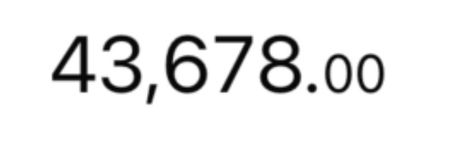
How can we reduce the font size of decimal value ?
How can we reduce the font size of Decimal Value in excel? (Just like its shown in image)

NikolinoDE
Oct 01, 2023Platinum Contributor
Alternatively, you could do it with VBA without having to convert it to text.
Attached is an example file.
- HansVogelaarOct 01, 2023MVP
Niko, please note that the values in your sample workbook are text values. They are left-aligned while horizontal alignment is set to General, and the formula =SUM(A1:A3) returns 0.
If I convert the values to numbers, your macro has no effect.
- NikolinoDEOct 01, 2023Platinum ContributorYou're absolutely right, my mistake. Too focused on the point and not on the task. I apologize for the confusion. Adjusting the font size for certain parts of the number is not a built-in function in Excel's VBA, or is there a way?...to do this with VBA.
- HansVogelaarOct 01, 2023MVP
It is not possible to format part of a number, date or TRUE/FALSE value differently from the rest, only of text values. And if a cell contains a formula, it is not possible at all, regardless of the data type of the return value.
