Forum Discussion

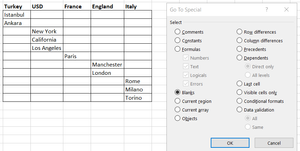
How can i resolve this problem?
 Mar 22, 2020
Have you tried the Filter function ?
Example in file with your source data "as is" in first sheet, and with your source data in a table in second sheet.
"=FILTER(Table1[Provinces];Table1[Countries]=G$1)"


Yes, it works. But i was after how i can get rid of blank cells. what was your strategy to get rid of blank cells ?
- Detlef_LewinMar 22, 2020Silver Contributor
- SekoleyteMar 22, 2020Iron Contributor
Detlef_Lewin thank you for your answer. Power Query is a new world for me, i think i need to learn something about it, it looks useful. But i didn't understand how i can do what you did in Power Query for my issue 🙂🙂
- Detlef_LewinMar 22, 2020Silver Contributor
You can have a look at the queries.
The steps in principle:
Grouping "Countries" with "All Rows".
Added a custom column to get a list of provinces for every country.
Extracted values of column "Benutzerdefiniert" to get the provinces into one cell.
Removed column "AllData".
Split column "Benutzerdefiniert" by delimiter.
Transposed the table.
Promoted the headers.