Forum Discussion

How can formula return the 3 largest values
- Jun 20, 2022
How about
=TEXTJOIN(", ",TRUE,INDEX(FILTER(D2:D16&E2:E16,(A2:A16="238001")*(B2:B16="Thất lạc tại Bưu cục
网点到件遗失")*(C2:C16>=LARGE(C2:C16,3)),""),SEQUENCE(3)))

That is a rather unhelpful sample workbook since the three largest values are the ONLY values.
You can use the formula
=TEXTJOIN(",",TRUE,FILTER(B2:B5&C2:C5,A2:A5>=LARGE(UNIQUE(A2:A5),3)))
- littlevillageJun 18, 2022Iron Contributor
Hi HansVogelaar,
Thanks for your response
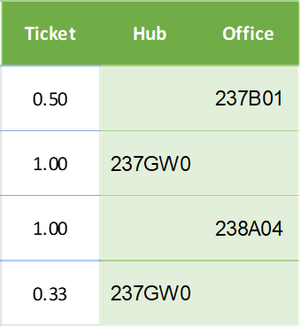
You have sent me a great formula for this case. I did it well for the sample file. But have something with full file that has more than the same 3 largest values. In this example is three number 1. The formula returns 5 values (237E51, 238GW0, 238A04, 237W01, 237B01). However I just want to receive 3 values with the 3 largest values in column C (1, 0.5, 0.33)My formula:
=TEXTJOIN(", ",TRUE,FILTER(D2:D16&E2:E16,(A2:A16="238001")*(B2:B16="Thất lạc tại Bưu cục
网点到件遗失")*(C2:C16>=LARGE(UNIQUE(C2:C16),3)),""))I have added an image and the link of full file below
https://docs.google.com/spreadsheets/d/1nzBuLgDSLXrR911oGqD48UjxXZTVjliu/edit?usp=sharing&ouid=112310544159929632856&rtpof=true&sd=true
Hope for your response
Thanks a lot- HansVogelaarJun 18, 2022MVP
Here you go, but now it won't return the same result in your earlier example...
- littlevillageJun 19, 2022Iron Contributor
The formula doesn't return the three values in column D and E, if there are more than three number 1 in column C , I have added 4 number 1 in column C then the formula return is 4 values.
the link of full file below
https://docs.google.com/spreadsheets/d/1nzBuLgDSLXrR911oGqD48UjxXZTVjliu/edit?usp=sharing&ouid=112310544159929632856&rtpof=true&sd=true
