Forum Discussion

How can a remove these files from the 'Recent' list?
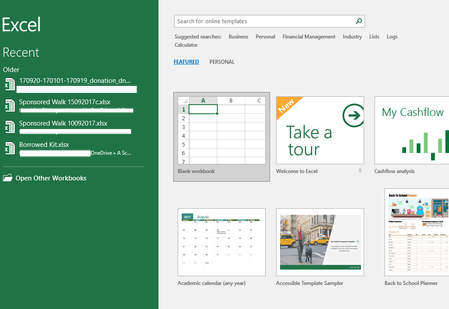

Tim,
Strange. Just tested - created new workbook, saved it on my OneDrive. Closed Excel, opened again, in backstage in Recent remove that file from the list. Closed and opened again - no this file in the list.
Will it work in your environment with new file if you repeat? Are old files pinned?

Hi Sergei. This has been solved by a user on another forum. I ran this code:
Sub Clear_Dead_Files()
Dim i As Long
On Error Resume Next
OriginalMax = Application.RecentFiles.Maximum
Application.RecentFiles.Maximum = 50
For i = Application.RecentFiles.Count To 1 Step -1
If Dir(Application.RecentFiles(i).Name) = "" Then
Application.RecentFiles(i).Delete
End If
Next
Application.RecentFiles.Maximum = OriginalMax
End Sub
- SergeiBaklanOct 09, 2017Diamond Contributor
Tim, I see, thank you for sharing
- Tim ShilesOct 09, 2017Copper Contributor
It's not worked Sergei. They have all just reappeared!
- SergeiBaklanOct 09, 2017Diamond Contributor
What if try to remove records in registry? In my case they are here
\HKEY_CURRENT_USER\Software\Microsoft\Office\16.0\Excel\User MRU\ADAL_DD1AF6899A1D34757527B91E62265BA246E4EB786064EAB146034A0FC1A28211\File MRU
but i didn't test that
- Tim ShilesOct 09, 2017Copper ContributorIgnore that last post; they have all reappeared!