Forum Discussion

Tim Shiles
Oct 09, 2017Tin Contributor
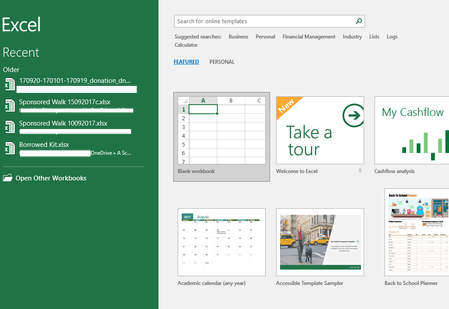
How can a remove these files from the 'Recent' list?
How can a remove these files from the 'Recent' list please? I've deleted these workbooks from OneDrive, but they still appear in the Recent list. How can I stop them appearing every tim...

Guy Musing
Oct 09, 2017Copper Contributor
Open an Excel spread sheet
Go to File - Options - Advanced
scroll down to the 'Display' section
look for "Show this number of recent worksbooks" and change the number to zero (0).
click OK.
you'll notice that the recent documents in the Recent pane are cleared.
Go to File - Options - Advanced
scroll down to the 'Display' section
look for "Show this number of recent worksbooks" and change the number to zero (0).
click OK.
you'll notice that the recent documents in the Recent pane are cleared.
 kcharris0508Jan 20, 2026Tin Contributor
Doesn't work. In addition, I have found every reference to the files in the list and removed them. They still show up!
I right click, remove them, and the next time I open any workbook, they show back up. They are not referenced anyway in he registry, nor the file system except in the "Archive" directory where they live. But somehow Excel thinks I've opened them recently. Tim ShilesOct 09, 2017Tin Contributor
Thanks Guy. That gets rid of them, but then I can't see any recent workbooks. I want to be able to see some, just not those that no longer exist.
- SergeiBaklanOct 09, 2017Diamond Contributor
Right click -> Remove from list shall work
- kcharris0508Jan 20, 2026Tin Contributor
Only until I close the workbook, then they come back.
