Forum Discussion

TIGER-18
Nov 13, 2023Copper Contributor
highlight duplicates in sheets with 2 criteria
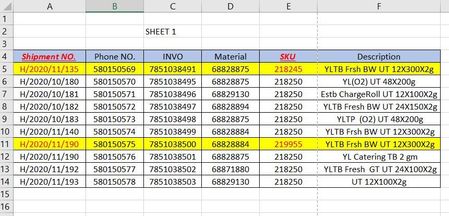
I Have a workbook with multiple sheets and I want to highlight the row if the value in column A "Shipment NO" & column E "SKU" both have been duplicated in other sheets below is what I'm looking for...

Lorenzo
Nov 13, 2023Silver Contributor
Hi TIGER-18
I want to highlight the row if the value in column A "Shipment NO" & column B "SKU" (SKU are in column E)
#1 I have the following row highlighted in Sheet2. Misunderstanding on my side or your mistake?
#2 Are you on Windows with Excel >/= 2016 or on Mac with Excel 365 up to date?

TIGER-18
Nov 13, 2023Copper Contributor
Lorenzo Hi
My mistake the column A "Shipment NO" & column E "SKU" i want to check if both values have been duplicated in other sheets.
I'm using windows 365 Microsoft.
regarding for shipment H/2020/11/190 I forgot to highlighted in sheet2 here the revised photo
- LorenzoNov 14, 2023Silver Contributor
Hi TIGER-18
In attached file a Power Query based solution:
- Data in Sheet1-Sheet3 formatted as Tables
- 3 queries - respectively for Sheet1, Sheet2 and Sheet3 - load on SHEET_TO_HIDE (TRUE means a duplicate was found in any of the other 2 sheets/tables)
- Conditional Formatting rules in Sheet1-Sheet3 refer to the 3 tables in SHEET_TO_HIDE
- The 3 queries auto-refresh when the file opens. You can also ask a Refresh by going to Data (tab) > Refresh All. It's also possible to configure the queries to auto-refresh every n minutes if you need...
- TIGER-18Nov 14, 2023Copper ContributorThank you so much but I prefer if you have idea to do formula in helper column then i will do conditional formatting against that helper column.