Forum Discussion

Highlight cells on the results of calculated & conditionally formatted cell
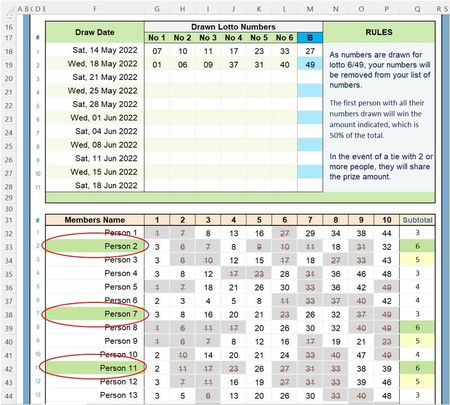
- Aug 13, 2022
- No reason to change the 1st rule (filling grey) as it doesn't apply to your Subtotal col. Keep it is was
- 2nd rule (filling red) can be adapted to Apply to F32:F81
- 3rd rule (Graded Color Scale), no way. Such rule apply to a single column only and that column must contain numeric values. The only way to go would be to replace this rule by n rules, each matching a number/value (or range of numbers) and filling the corresponding cell(s) with a different color

Hi DBrydon
Not sure this will work because you don't disclose the Conditional Formatting rule that Applies to Q32:Q81 to highligh Subtotals in green
Edit that Conditional Formatting rule. It currently Applies to: $Q$32:$Q$81
Add ,$F$32:$F$81 at the end:
 DBrydonAug 13, 2022Copper Contributor
Lorenzo Sorry for not providing all the necessary info. I tried to apply your suggestion (hopefully I got that correct :-)), however, no changes occurred.
I've tried to capture the Conditional Formatting screen for your review.
- LorenzoAug 13, 2022Silver Contributor
- No reason to change the 1st rule (filling grey) as it doesn't apply to your Subtotal col. Keep it is was
- 2nd rule (filling red) can be adapted to Apply to F32:F81
- 3rd rule (Graded Color Scale), no way. Such rule apply to a single column only and that column must contain numeric values. The only way to go would be to replace this rule by n rules, each matching a number/value (or range of numbers) and filling the corresponding cell(s) with a different color
- DBrydonAug 13, 2022Copper ContributorIt was just a cosmetic consideration, so I can leave it as is; I shouldn't try to overcomplicate it, or my abilities.
Thank you, as I appreciate your time and guidance.
Cheers.
Dave