Forum Discussion

Hide error strings
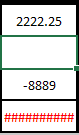

The simple answer is "Yes"
In fact, there are probably several ways to do it. Can you upload your actual file (or a sample of it) so that I or someone else can give a specific recommendation?
In the absence of that, let me recommend that you research functions like IFERROR or IFNA as potential solutions. You might be able to resolve this totally on your own through one of those.

- Riny_van_EekelenFeb 26, 2020Platinum Contributor
JoeRock There is no error! You formula in C5 merely returns a value of -$177,775,00. The column width is simple not large enough the display that number. See below.
- JoeRockFeb 28, 2020Copper Contributor
Riny_van_Eekelen Thank you for that info. I guess the question now would be: Is there a way to hide the info in C4 and C5 unless both C2 and C3 have data entered into them?
- Riny_van_EekelenFeb 28, 2020Platinum Contributor
In C4:
=IF(OR(ISBLANK(C2),ISBLANK(C3)),"",(C3-C2)/0.25)in C5:
=IF(OR(ISBLANK(C2),ISBLANK(C3)),"",C4*12.5).... or see attached.
Although, I note that C3 is not part of any of your formulae, so C3 being blank or not has no impact..Edit: Corrected the first formula!
