Forum Discussion

Hi, I need Help to replace this formule by an macro please !!!!
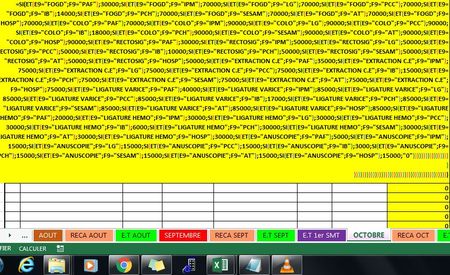

Another approach is to use if-then-else statements but if that's the goal then could you provide the cell location of the formula, like (my cell if H9 and will be checking E9,F9) also, is there a range we can take as our basis to know which are the first and last rows? or do you have a defined first and last row?
These "check-ups" come from another table or do you make them from a list which was handed to you?
 Alioune Badara DIOUFSep 29, 2017Copper Contributor
I use the function, but excel says you can not override 64 imbrication so I would like to replace it with a marco. My problem is In my life I never uses macro.. Even know how to began.. I know nuthing about that.
- CARLOS ADRIANOct 01, 2017Tin Contributor
Also, going by Sergei Baklan's answer, so you are able to update data faster, I've made it into a table so you only use that reference and copy the table to a hidden sheet. The formula is at right from his.
- Alioune Badara DIOUFOct 02, 2017Copper Contributor
Thaankk U so Much Carlos Adrian, Im so glad, I add 1 column named "COTATION" to complet my work.
And thanks for all for your help.
- SergeiBaklanSep 30, 2017Diamond Contributor
Hi Alioune,
You may use another function instead
=SUMPRODUCT(($A4=$K1:$K100)*($B4=$L1:$L100)*$M1:$M100)
if you put your first text, second text and number in columns K, L and M accordingly. Or if you prefer hardcording that could be like
=SUMPRODUCT(($A4={"FOGD", "FOGD", "FOGD", ...})*
    ($B4={"PAF", "IPM", "LG", ...})*
    {30000,70000,70000,...})
as in attached sample
- Alioune Badara DIOUFOct 02, 2017Copper Contributor
Thaankk U so Much Sergei Baklan, Im so glad, I add 1 column named "COTATION" to complet my work.
And thanks for all for your help.
