Forum Discussion

Peter_D1972
Jun 19, 2023Copper Contributor
Help with VLOOKUPIF formula
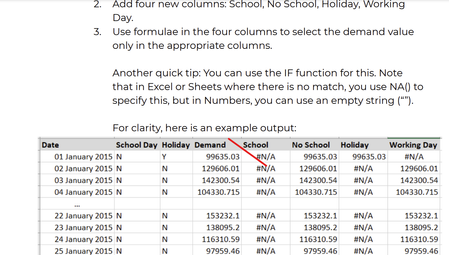
Hi - I need to produce a table like the first image using the data from the second but I am gettting confused as to what exact formula to use for this to work. I definitely need to use the IF featur...
- Jun 19, 2023
Peter_D1972 Well, the quick tip tells it all. Look into the help section for the IF function.
=IF(logical_test, value_if_true, value_if_false)
In your example the logical test in E2 would be:
B2="Y"
value if true:
D2
value if false:
NA()
I trust you can figure out how to write the formula and apply similar ones to the other columns.

Riny_van_Eekelen
Jun 19, 2023Platinum Contributor
Peter_D1972 Well, the quick tip tells it all. Look into the help section for the IF function.
=IF(logical_test, value_if_true, value_if_false)
In your example the logical test in E2 would be:
B2="Y"
value if true:
D2
value if false:
NA()
I trust you can figure out how to write the formula and apply similar ones to the other columns.
 Peter_D1972Jun 20, 2023Copper ContributorThank you Riny - I am a bit of a formula novice as you can tell!