Forum Discussion

Help with transferring data into different tabs
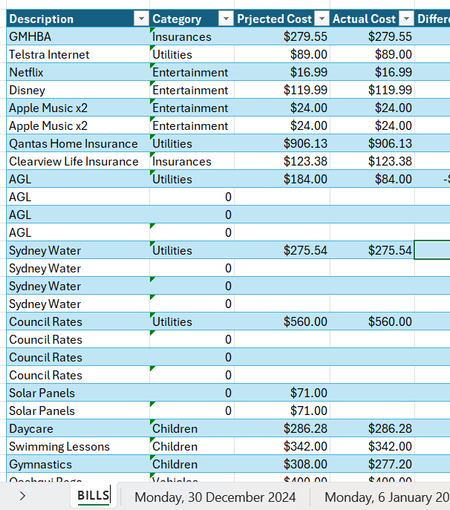

Let me underscore what Patrick2788 has suggested. What you seem to be doing made sense back in the days of paper-based accounting systems. It doesn't make sense with a computer program like Excel at your disposal.
Excel is really good at taking a well-designed database of transactions and producing monthly or weekly summaries on-demand. OR, in the case of a set of financial transactions for the year, the Pivot Table tool is wonderful in its ability to produce a cross-tabulated summary of expenses by budget category and month.
I'm attaching a VERY simple example of what the Pivot Table can do with a long series of financial transactions, both income and expense, with sub-categories of each. I have a much more elaborate system for tracking my family expenses, but it's very personal so I can't share it; trust me, though, it has two levels of budget categories (e.g., Fixed Expenses, with the subcategories of things like Mortgage, Car Payments, Insurance)....and I've tracked expenses from two bank accounts, four credit cards, income and outflow, for at least 10 years. It's all in one raw data database, with two or three "reports" or "output sheets" that can be customized for date ranges or other variables.
It's a design mistake to create a new tab for every week. Seriously. Let Excel do that breaking out on demand for whatever week (or month, or quarter, or year) you want to view.

Can I ask, if I have a bill is due monthly or quarterly, as it has multiple different due dates do I have to add it 12, 4 times to the raw data?