Forum Discussion

Exceluser12161944
Nov 27, 2024Copper Contributor
Help with SUMIFS formula
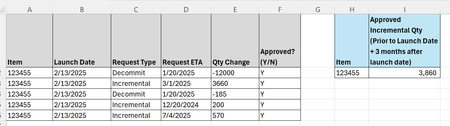
Looking for help to create a formula for Cell I2. I think this will be a SUMIFS formula but not sure the details of the formula, or if there is an easier formula to use. I need to calculate the tota...

m_tarler
Nov 27, 2024Silver Contributor
Is 90 days good enough? then
=SUMPRODUCT( (E2:E10)*(A2:A10="123455")*(C2:C10= "Incremental")*(F2:F10="Y")*(D2:D10<=B2:B10+90))
the problem with SUMIFS and also the problem with using EDATE(..., 3) is if Launch Date is not a fixed/single value. If it is a fixed value then:
=SUMPRODUCT( (E2:E10)*(A2:A10="123455")*(C2:C10= "Incremental")*(F2:F10="Y")*(D2:D10<=EDATE($B$2,3)))
or
=SUMIFS( E2:E10,A2:A10,"123455",C2:C10, "Incremental",F2:F10,"Y",D2:D10, "<="&EDATE($B$2,3))
or you could get 'fancy' and use LAMBDA to overcome the problem:
=SUMPRODUCT( (E2:E10)*(A2:A10="123455")*(C2:C10= "Incremental")*(F2:F10="Y")*(D2:D10<=MAP(B2:B10,LAMBDA(q,EDATE(q,3)))))