Forum Discussion

Exceluser12161944
Nov 27, 2024Copper Contributor
Help with SUMIFS formula
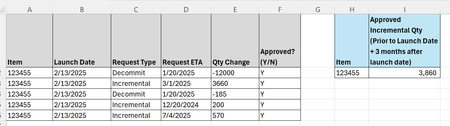
Looking for help to create a formula for Cell I2. I think this will be a SUMIFS formula but not sure the details of the formula, or if there is an easier formula to use. I need to calculate the tota...

Rodrigo_
Nov 27, 2024Steel Contributor
Formula: =SUMIFS(E:E, A:A, H2, C:C, "Incremental", F:F, "Y", D:D, ">="&B2-90, D:D, "<="&B2+90)
- Rodrigo_Nov 27, 2024Steel Contributor
Or use this sumproduct like this:
=SUMPRODUCT((A2:A100=$H$2)*(C2:C100="Incremental")*(F2:F100="Y")*(D2:D100<=B2:B100+90)*( (D2:D100<B2:B100)+(D2:D100>B2:B100) )*(E2:E100))
to be more flexible, and ensure the date in column D is within 90days before or after in column B by row.