Forum Discussion

JoNC_NZ293
Jun 11, 2023Copper Contributor
Help with Spill function issue
Hi all I have inherited this spreadsheet and I need to adjust the threshold that is used in the calculation. It seems to be a simple change but I am getting a #SPILL error that I can't resolve. ...
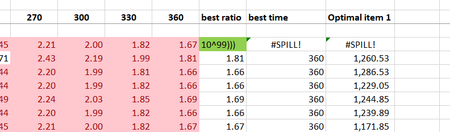
- Jun 11, 2023By simplifying it to =MIN(IF(AF6:AQ6>2.5,AF6:AQ6), you are still using the MIN function with an array formula, but without the spill behavior. It will return the minimum value from the range AF6:AQ6 that is above the threshold of 2.5.
If the simplified formula meets your requirements and provides accurate results, then you can continue using it. Remember to adjust the threshold value as needed.
I wish you continued success with Excel!

NikolinoDE
Jun 11, 2023Platinum Contributor
By simplifying it to =MIN(IF(AF6:AQ6>2.5,AF6:AQ6), you are still using the MIN function with an array formula, but without the spill behavior. It will return the minimum value from the range AF6:AQ6 that is above the threshold of 2.5.
If the simplified formula meets your requirements and provides accurate results, then you can continue using it. Remember to adjust the threshold value as needed.
I wish you continued success with Excel!
If the simplified formula meets your requirements and provides accurate results, then you can continue using it. Remember to adjust the threshold value as needed.
I wish you continued success with Excel!

JoNC_NZ293
Jun 11, 2023Copper Contributor
Yes that is what I need. I'm not sure why it was set up as it was when only a single value was required.
And yes i have adjusted the threshold to use a value from elsewhere in the sheet so that I can adjust it as needed, ie. =MIN(IF(AF6:AQ6>=$I$1,AF6:AQ6))
And yes i have adjusted the threshold to use a value from elsewhere in the sheet so that I can adjust it as needed, ie. =MIN(IF(AF6:AQ6>=$I$1,AF6:AQ6))