Forum Discussion

Danelle13
Mar 10, 2022Copper Contributor
Help with #REF! Error
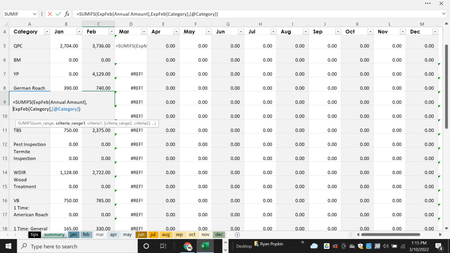
Hi! I have a spreadsheet set up which talleys sales for each type of service sold each month (each month is an individual sheet) and then it has a summary sheet which talleys the amount ...

Danelle13
Mar 10, 2022Copper Contributor
removed

HansVogelaar
Mar 10, 2022MVP
The table on the Mar sheet should be named ExpMar, but it is named ExpJan5.
Click in any cell of that table, for example in A2 on the Mar sheet.
Activate the Table Design tab of the ribbon.
Change the Table Name in the Properties group to ExpMar.
Switch to the Summary sheet.
Remove the apostrophe from before the formula in D5. It should now return a value.
Double-click the fill handle in the lower right corner of D5 to fill the formula down.
- Danelle13Mar 11, 2022Copper ContributorThank you so much for your help!@
- mtarlerMar 10, 2022Silver ContributorIn addition to that Table Name the formula in the Mar Column was using incorrect column names. Try this:
=SUMIFS(ExpMar[Annual Amount],ExpMar[Category],[@Category])
I updated the file that was linked.
