Forum Discussion

Help with Moving Rows to columns
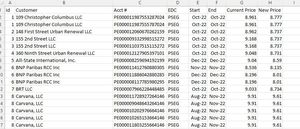

Copy Sheet first to prevent data loss.
With the copied sheet, select entire table range and then
go to Data> Remove Duplicates
Only tick A column (ID) and then press ok.
That's it.
 cheeneyMar 28, 2022Copper Contributor
Starrysky1988 Sorry maybe I did not explain correctly. I need to move the data in any matching row ID so they are all in one row.
So row two would move up to row one but retain all data from both rows.
- Starrysky1988Mar 28, 2022Iron Contributor
What you want is only 1 row with line feeds in between the same ID, right? Whether there have got 1 line or more than 1 lines of data for each ID, the result must be only in 1 Row and it will be something like below.
A1| ID Customer .......
A2| 1 ?????@
?????@
A3| 2 ?????1
?????2
?????3
............
Please let me know if it is what you want.- cheeneyMar 28, 2022Copper Contributor
Starrysky1988 thanks again. What I need if the row ID is the same I need all that data ONLY on one row but I need to keep all that data. Like:
- SergeiBaklanMar 28, 2022Diamond Contributor
Power Query could do the job if you consider such option. Group table on ID and Text.Combine accounts on aggregation.
- cheeneyMar 28, 2022Copper ContributorThank you for the reply. I guess I am not Excel savvy enough to do this. Any services/individuals out there to pay to do this for me?
