Forum Discussion

Help with Formula to count game points
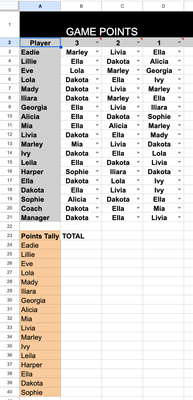

It's better to insert empty sheet before one with first game, another empty sheet after the latest game. Let name them start and end accordingly. Each new game tab is inserted in between. The rest depends do you have exactly the same players for all games; are their names in the same rows for each game or not; and on which Excel version you are.
In simplest case when the same player name is in the same row for each game in B4 for Total sheet could be
=SUM(start:end!B24)and drag it down.

yes thats correct, they are the same players in the same cells on each tab.
I tried your way (I think I did), but it's not working.
- SergeiBaklanApr 30, 2024Diamond Contributor
It looks like you are on Google Sheets. Perhaps it work differently, not sure. In any case it's better to discuss an issue on the sample file. In the attached one I changed the layout, but the idea is the same
Please share your sample file if still any questions.
- CGallagherInnerMay 01, 2024Copper ContributorThansk for your time, I already have the total for each game calculated, what I'm trying to do then is to look up the totals on each game tab and summarise it in the front TOTAL sheet for an easy to see consolidation of points occurring each game - So I'm after that formula for the first tab https://docs.google.com/spreadsheets/d/1MjXf5PD_Y1rtSWcO27Y2Ya-27Vnghb6Z/edit?usp=sharing&ouid=114052306069490797849&rtpof=true&sd=true
- SergeiBaklanMay 01, 2024Diamond Contributor