Forum Discussion

BethS1960
Aug 01, 2021Copper Contributor
help with formatting error
I've tried for 2 days to fix the errors and more or 2 math courses and can not figure it out. Any help would be greatly appreciated.

Riny_van_Eekelen
Aug 01, 2021Platinum Contributor
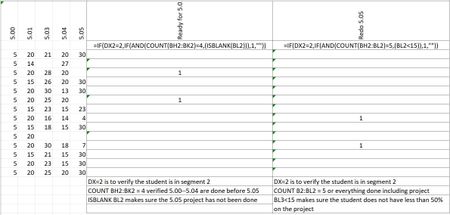
BethS1960 What "error"? Are you referring to the green triangles? Click on a cell with such marking. A warning triangle should appear. Click on it to see what the error entails. What do you get?

BethS1960
Aug 02, 2021Copper Contributor
The message says "the formula in this cell refers to a range that has additional numbers adjacent to it."
- Riny_van_EekelenAug 02, 2021Platinum Contributor
BethS1960 That's not an error. Excel warns you for something that may be wrong. If you are certain that the range(s) referenced in the formula is(are) correct, you can ignore the warning. Errors are displayed as #DIV0, #CALC, #NA, #VALUE or something similar.
If you don't want to see the green triangles you can switch off error checking. See the attached link for how to do that.
https://excelribbon.tips.net/T010655_Turning_Off_Error_Checking.html