Forum Discussion

Help with excel formula
 Jul 11, 2022
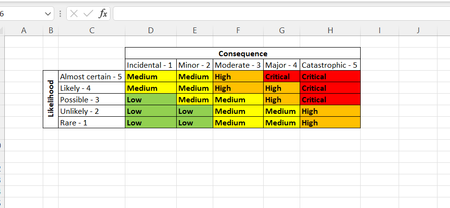
This is the formula in cell E11 in the attached example. The formula is copied down to cell E24 and the dropdowns are in range C11:D24. Conditional formatting is entered for range E11:E24.
=IFERROR(INDEX($C$3:$G$7,MATCH(C11,$B$3:$B$7,0),MATCH(D11,$C$2:$G$2,0)),"")
This is the formula in cell E11 in the attached example. The formula is copied down to cell E24 and the dropdowns are in range C11:D24. Conditional formatting is entered for range E11:E24.
=IFERROR(INDEX($C$3:$G$7,MATCH(C11,$B$3:$B$7,0),MATCH(D11,$C$2:$G$2,0)),"")
- Nikkie1977Jul 11, 2022Copper ContributorHow would you attached what you just sent me to an existing excel spreadsheet?
- OliverScheurichJul 11, 2022Gold Contributor
Without seeing the existing spreadsheet i can't tell. Maybe you can attach a picture of your spreadsheet without sensitive data or you can upload your file without sensitive data.
- Nikkie1977Jul 12, 2022Copper Contributor
OliverScheurich Sorry about that.
Below i have attached what the top of the excel document looks like as well as where the formulas should be. Column E should be the likelihood dropdown, F Consequence dropdown and G the Risk level result. Appreciate your help so much thank you!