Forum Discussion

Help with excel formula
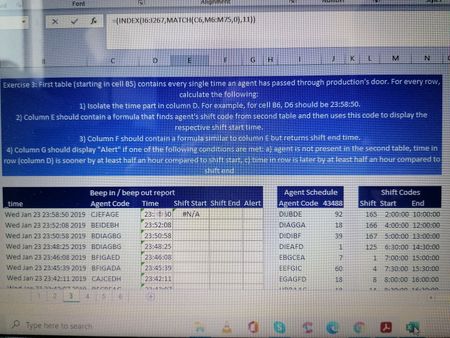
- Nov 15, 2020
In E6:
=INDEX($M$6:$M$75, MATCH(INDEX($J$6:$J$267, MATCH(C6, $I$6:$I$267, 0)), $L$6:$L$75, 0))
In F6:
=INDEX($N$6:$N$75, MATCH(INDEX($J$6:$J$267, MATCH(C6, $I$6:$I$267, 0)), $L$6:$L$75, 0))
In G6:
=IF(ISNA(MATCH(C6, $I$6:$I$267, 0)), "Alert", IF(OR(D6<E6-TIME(0, 30, 0), D6>F6+TIME(0, 30, 0)), "Alert", ""))

In E6:
=INDEX($M$6:$M$75, MATCH(INDEX($J$6:$J$267, MATCH(C6, $I$6:$I$267, 0)), $L$6:$L$75, 0))
In F6:
=INDEX($N$6:$N$75, MATCH(INDEX($J$6:$J$267, MATCH(C6, $I$6:$I$267, 0)), $L$6:$L$75, 0))
In G6:
=IF(ISNA(MATCH(C6, $I$6:$I$267, 0)), "Alert", IF(OR(D6<E6-TIME(0, 30, 0), D6>F6+TIME(0, 30, 0)), "Alert", ""))
 AngelikiEfthNov 15, 2020Copper Contributor
HansVogelaar thank you very much!! your help is much appreciated. Is it possible to explain to me in a few words what the formula for the question 4 does?
- HansVogelaarNov 15, 2020MVP
MATCH(C6, $I$6:$I$267, 0) returns either where the value of C6 is found in I6:I267, or #N/A if not found.
So ISNA(MATCH(C6, $I$6:$I$267, 0)) returns TRUE if the value of C6 is not found, FALSE if it is.
If ISNA(MATCH(C6, $I$6:$I$267, 0)) is TRUE, the formula returns "Alert".
Otherwise, it checks whether the time in D6 is either more than 30 minutes before the time in E6, or more than 30 minutes after the time in F6. If so, the formula returns "Alert", else an empty string "".