Forum Discussion

Help with dragging formula
- Mar 16, 2023
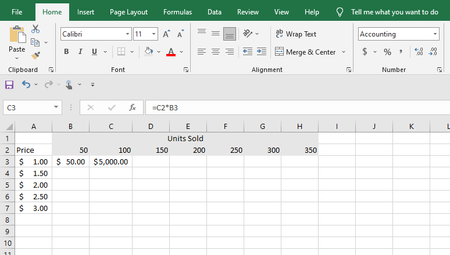
In B3 enter:
=$A3*B$3
This you can drag down (will keep the row number fixed to 3) and across (will keep the column fixed to A).
However, when you are on a modern Excel version you can enter this:
=A3:A7*B2:H2
in B3 and all results will be spilled out in one go without the need to copy down and across. Just make sure that all other cells in B3:H7 are empty.

In B3 enter:
=$A3*B$3
This you can drag down (will keep the row number fixed to 3) and across (will keep the column fixed to A).
However, when you are on a modern Excel version you can enter this:
=A3:A7*B2:H2
in B3 and all results will be spilled out in one go without the need to copy down and across. Just make sure that all other cells in B3:H7 are empty.

Great, that is exactly what I need! Thank you