Forum Discussion

Kyle_Thompson
Aug 22, 2023Copper Contributor
Help with cross referencing using XMATCH and INDEX.
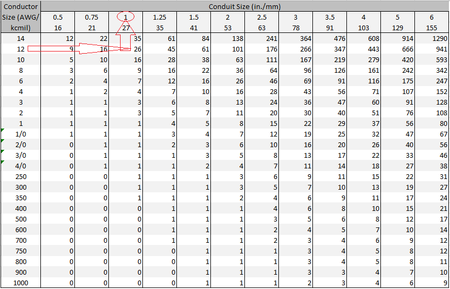
The task I'm trying to accomplish is to create an automatic lookup method for conduit sizing. I'm referencing the tables in Annex C of the 2023 NEC, and I've copied one portion into a spreadsheet whi...

mtarler
Aug 22, 2023Silver Contributor
You're right you are close. Leaving the column/row blank in INDEX (or giving it a 0) will return the whole row/column so in this case leaving the column blank (but you must still have the comma to indicate the column parameter):
=INDEX('THHN_THWN_THWN-2'!$C$4:$N$27,XMATCH(Test!$A3,'THHN_THWN_THWN-2'!$B$4:$B$27),)
should return the whole row so then wrap it with XLOOKUP:
=XLOOKUP(Test!$B3, INDEX('THHN_THWN_THWN-2'!$C$4:$N$27,XMATCH(Test!$A3,'THHN_THWN_THWN-2'!$B$4:$B$27),), 'THHN_THWN_THWN-2'!$C$2:$N$2, "not found", 1)
But if you use this in multiple locations (or even not) I recommend you NAME those ranges. for example:
ConduitRng = 'THHN_THWN_THWN-2'!$C$2:$N$2
ConductorRng = 'THHN_THWN_THWN-2'!$B$4:$B$27
CountRng = 'THHN_THWN_THWN-2'!$C$4:$N$27
so then the formula READS like:
=XLOOKUP($B3, INDEX(CountRng, XMATCH($A3, ConductorRng),), ConduitRng, "not found", 1)BTW since you used A3 as the conductor I am assuming B3 for the count.
and lastly you should be able to make an array output accordingly:
=XLOOKUP($B3:$B100, INDEX(CountRng, XMATCH($A3:$A100, ConductorRng),), ConduitRng, "not found", 1) Kyle_ThompsonAug 24, 2023Copper ContributorThank you! I appreciate the advice!