Forum Discussion

HELP required with formula or conditional formatting....
- Apr 12, 2021
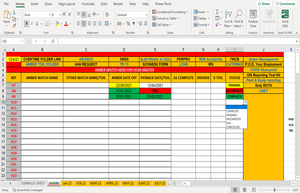
In your screenshot, the data began in row 7. In your workbook, they begin in row 4, so the formula has to be adjusted accordingly. In the following formula for I4, I also took empty cells into account:
=IF(AND(D4="",E4=""),"",IF(OR(D4="TBC",E4="TBC"),"Incomplete",IF(OR(D4>TODAY(),E4>TODAY()),"Pending","Complete")))

Good morning, I have encountered a problem with the latest version you very kindly constructed for me.
PAO and N/A gave incorrect values in the status column.
I have updated the sheet and added a few comments in the hope this may be of benefit if you can still assist me.
Kind regards.

Sorry, I switched a condition.
=IF(AND(D4="",E4=""),"",IF(OR(D4="TBC",E4="TBC"),"INCOMPLETE",IF(OR(E4={"N/A","PAO"}),IF(D4>TODAY(),"INCOMPLETE","COMPLETE"),IF(MAX(D4:E4)>TODAY(),"PENDING","COMPLETE"))))
If I8 and I10 should be pending, contradicting your earlier description:
=IF(AND(D4="",E4=""),"",IF(OR(D4="TBC",E4="TBC"),"INCOMPLETE",IF(OR(E4={"N/A","PAO"}),IF(D4>TODAY(),"PENDING","COMPLETE"),IF(MAX(D4:E4)>TODAY(),"PENDING","COMPLETE"))))
- SP8Y8Apr 13, 2021Copper Contributor
HansVogelaar absolutely brilliant! This works perfectly. Thanks you very much for all your time and help. Very much appreciated.
Colin.