Forum Discussion

HELP required with formula or conditional formatting....
- Apr 12, 2021
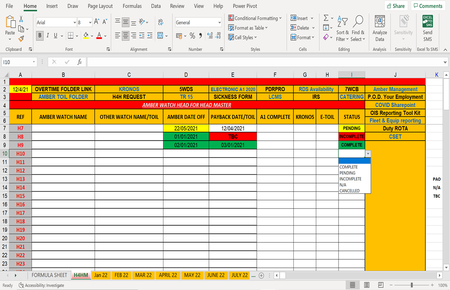
In your screenshot, the data began in row 7. In your workbook, they begin in row 4, so the formula has to be adjusted accordingly. In the following formula for I4, I also took empty cells into account:
=IF(AND(D4="",E4=""),"",IF(OR(D4="TBC",E4="TBC"),"Incomplete",IF(OR(D4>TODAY(),E4>TODAY()),"Pending","Complete")))

HansVogelaar Hi Hans,
I tried that formula and unfortunately the value changed in I7 to "Complete" every time, despite the value entered in D and E.
In the I column, there has to be a rule order,
1. if either cell in the D and E columns has a "TBC" then the I cell should be "incomplete",
2. if either of the D and E columns has a date in the future (yellow) then the I cell should read "Pending"
3. Only if both D and E are dates that have passed or todays date then I cell should read "Complete"
I have attached a copy of the work sheet to see if that is of any help to you.
Regards

In your screenshot, the data began in row 7. In your workbook, they begin in row 4, so the formula has to be adjusted accordingly. In the following formula for I4, I also took empty cells into account:
=IF(AND(D4="",E4=""),"",IF(OR(D4="TBC",E4="TBC"),"Incomplete",IF(OR(D4>TODAY(),E4>TODAY()),"Pending","Complete")))
- SP8Y8Apr 12, 2021Copper Contributor
HansVogelaar Slight issue that I did not foresee, I will need the following added to the formula,
If D or E column have PAO or N/A in it, then column I should read complete or incomplete based on the date in the other column..... As per attachment.......Help again please?
- HansVogelaarApr 12, 2021MVP
Here is a new version:
=IF(AND(D4="",E4=""),"",IF(OR(D4="TBC",E4="TBC"),"INCOMPLETE",IF(OR(D4={"N/A","PAO"},E4={"N/A","PAO"}),IF(MAX(D4:E4)>TODAY(),"COMPLETE","INCOMPLETE"),IF(MAX(D4:E4)>TODAY(),"PENDING","COMPLETE"))))
- SP8Y8Apr 13, 2021Copper Contributor
Good morning, I have encountered a problem with the latest version you very kindly constructed for me.
PAO and N/A gave incorrect values in the status column.
I have updated the sheet and added a few comments in the hope this may be of benefit if you can still assist me.
Kind regards.
- SP8Y8Apr 12, 2021Copper Contributorapologies, for the confusion there, I have now applied this and it works! Thanks you so much for your help Hans.