Forum Discussion

Help Needed with Unique Filter Formula
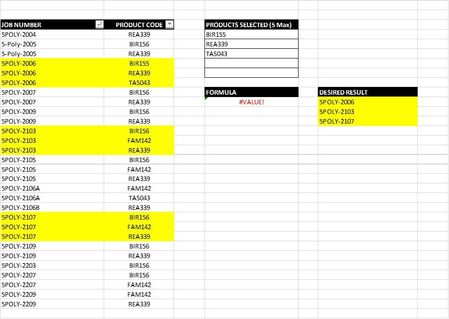
- Feb 27, 2024
CM1927 sorry we didn't understand what you needed. If i understand correctly now, you want to only return items that ONLY have those criteria items and ALL of those criteria items. this is a little harder and the formula a bit more complicated but with office 365 this should work:
=LET(names,A4:A19,codes,B4:B19,criteria,D4:D6,
UNIQUE(FILTER(names,BYROW(names,LAMBDA(a,IFERROR(PRODUCT(--(SORT(UNIQUE(FILTER(codes,names=a)))=SORT(criteria))),0))),"")))


This formula is intended as a full-on exploration of newly available functionality.
= LET(
    BooleanArray, CODE=TOROW(REQUIRED,3),
    groupedByJob, GROUPBY(JOB, BooleanArray, OR,,0),
    distinctJobs, TAKE(groupedByJob,,1),
    matchingCrit, BYROW(DROP(groupedByJob,,1), AND),
    FILTER(distinctJobs, matchingCrit)
  )
1. The first line compares every code with each of the required codes.
2. Next, they are grouped by job to see whether the required codes are to be found in any instance of the job (see image).
3 & 4. The jobs are simply separated to there own array but the criteria for each job are combined, requiring that all (three) are satisfied.
5. Finally the distinct jobs are filtered by the combined criterion to give the result.