Forum Discussion

Help Needed with Unique Filter Formula
- Feb 27, 2024
CM1927 sorry we didn't understand what you needed. If i understand correctly now, you want to only return items that ONLY have those criteria items and ALL of those criteria items. this is a little harder and the formula a bit more complicated but with office 365 this should work:
=LET(names,A4:A19,codes,B4:B19,criteria,D4:D6,
UNIQUE(FILTER(names,BYROW(names,LAMBDA(a,IFERROR(PRODUCT(--(SORT(UNIQUE(FILTER(codes,names=a)))=SORT(criteria))),0))),"")))


Job number 2103 and 2105 has exactly the same product codes. Yet you have selected 2103 but not 2105. That makes your question very ambiguous.
 CM1927Feb 27, 2024Copper Contributor
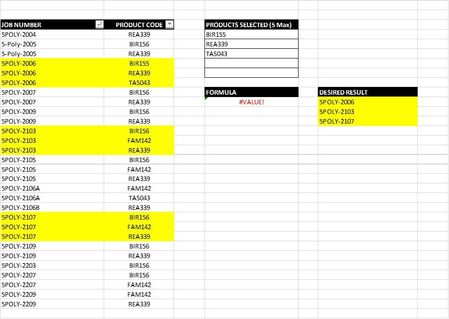
My mistake. Let's try this again. A new screenshot is pasted below.
I'm looking for a Unique Filter formula that returns only the job numbers that contains the product codes selected in cells D12:D14.
In this example, only one job number contains all three product codes selected (BIR155, REA339, and TAS043).
Any help you can provide will be greatly appreciated. Thanks.
- m_tarlerFeb 27, 2024Silver Contributor
CM1927 sorry we didn't understand what you needed. If i understand correctly now, you want to only return items that ONLY have those criteria items and ALL of those criteria items. this is a little harder and the formula a bit more complicated but with office 365 this should work:
=LET(names,A4:A19,codes,B4:B19,criteria,D4:D6,
UNIQUE(FILTER(names,BYROW(names,LAMBDA(a,IFERROR(PRODUCT(--(SORT(UNIQUE(FILTER(codes,names=a)))=SORT(criteria))),0))),"")))