Forum Discussion

Tobysan
Jan 31, 2026Tin Contributor
Help needed with IF and COUNTIFS Formulas
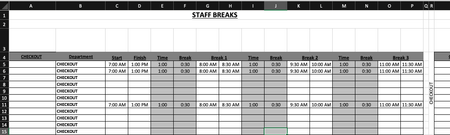
Is anyone able to advise the following formula: =COUNTIFS($B$5:$B$15,$R$4,$C5:$C15,"<=" & V3,$D5:$D15, ">" & V3)-COUNTIFS($B$5:$B$15,"="&$R$4,$G5:$G15,"<=" & V3,$H5:$H15, ">" & V3)-COUNTIFS($B$5:$B$...

m_tarler
Feb 03, 2026Silver Contributor
I believe the problem you are having is due to round off errors
as you can see the 8:30 AM in cell H5 is rounded up to ....7 while the 8:30 AM in cell AA3 is truncated at ....6
this error could go either way. Forcing a ROUND(AA3,9) and of the values in columns C:P may be needed but rounding of columns C:P will cause propogation of roundoff error as they 'build' on each other. and you can't use ROUND(H5:H15) in the COUNTIFS formula because that must be a range.
You could convert that whole formula to use something like:
=LET(t,ROUND(U3,9),s,($B$5:$B$15=$R$4)*
         ( (ROUND(--$C5:$C15,9)<=t)*(ROUND(--$D5:$D15,9)>t)
        -(ROUND(--$G5:$G15,9)<=t)*(ROUND(--$H5:$H15,9)>t)
        -(ROUND(--$K5:$K15,9)<=t)*(ROUND(--$L5:$L15,9)>t)
        -(ROUND(--$O5:$O15,9)<=t)*(ROUND(--$P5:$P15,9)>t) ),
        SUM(IF(ISERR(s),0,s) ) )
in this case I round all the values to 9 digits and then do the comparisons.
I will edit this if I think of something better.