Forum Discussion

Help needed with Date function
 Jan 17, 2024
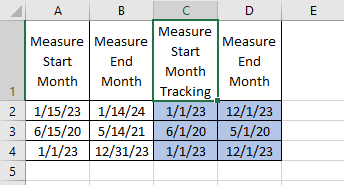
Your expected values for Measure End Month do not actually match your stated "12 months" (as in 12 full months), but instead are 11 months after the Measure Start Month Tracking. (Cell D3 is off by one year, apparently a mistype.)
So if 12 months from your column C date is what you want, a simple formula for column D is:=IF( ISNUMBER(A2), DATE(YEAR(A2), MONTH(A2)+12, 1), "")
But if the latter (11 months) is what you want, then use:=IF( ISNUMBER(A2), DATE(YEAR(A2), MONTH(A2)+11, 1), "")
In both cases, the contents of column B are irrelevant.
If you should decide you want to calculate the date that is the last day of a month, you can either use 0 for the third parameter to the DATE function (with a second parameter that is one month "too large"), or use the EOMONTH function instead.
Aside: Note that your current formula should actually use 1 rather than the (misleading, but accidentally accurate) DAY(1).
Your expected values for Measure End Month do not actually match your stated "12 months" (as in 12 full months), but instead are 11 months after the Measure Start Month Tracking. (Cell D3 is off by one year, apparently a mistype.)
So if 12 months from your column C date is what you want, a simple formula for column D is:
=IF( ISNUMBER(A2), DATE(YEAR(A2), MONTH(A2)+12, 1), "")
But if the latter (11 months) is what you want, then use:
=IF( ISNUMBER(A2), DATE(YEAR(A2), MONTH(A2)+11, 1), "")
In both cases, the contents of column B are irrelevant.
If you should decide you want to calculate the date that is the last day of a month, you can either use 0 for the third parameter to the DATE function (with a second parameter that is one month "too large"), or use the EOMONTH function instead.
Aside: Note that your current formula should actually use 1 rather than the (misleading, but accidentally accurate) DAY(1).
