Forum Discussion

Help needed with creating a formula
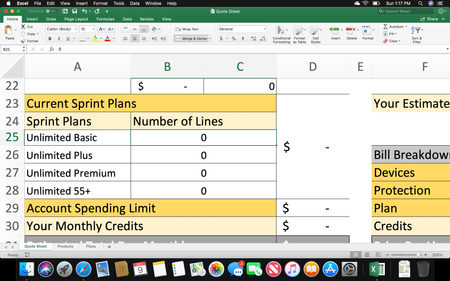

In what order are the different plans evaluated? Strictly on the price? So, it's always Premium, Plus, Basic, in that order? And how does 55 combine with any of the others? It is only in the first two lines.
So, just for the fist three, try
=IF(B27>0,SUM(INDEX(Plans!D:D,2):INDEX(Plans!D:D,'Quote Sheet'!B27)),0)+
IF(B26>0,SUM(INDEX(Plans!C:C,2+B27):INDEX(Plans!C:C,2+B27+B26-1)),0)+
IF(B25>0,SUM(INDEX(Plans!B:B,2+B27+B26):INDEX(Plans!B:B,2+B27+B26+B25-1)),0)
Thanks for your reply, but I had changed it a little bit before I read your message. Im getting there but still need a bit of assistance. Premium lines are always first priority, followed by Plus, then Basic. As you can see I added a drop down on the actual quote sheet under the number of lines section that relates to the number of lines on the table, and inputs a price under the Prices section. In the first original picture of this thread you'll notice a correlation between the plans. Each line on Plus is an extra $10 than Basic, and each line on Premium is an extra $30 than basic. So my new formulas just use the Basic pricing plus the number of lines under plus or premium multiplied by either 10 or 30. Here are the formulas that I have for each of the unlimited plans in the Prices section:
Basic: =IF(B25="","",VLOOKUP(B25,PlansTable,3,0))+(B25*0)
Plus: =IF(B26="","",VLOOKUP(B26,PlansTable,3,0))+(B26*10)
Premium: =IF(B27="","",VLOOKUP(B27,PlansTable,3,0))+(B27*30)
My question is, you'll also notice that no matter what plan is chosen, the difference between line 1 and line 2 is $20. The difference between line 2 and line 3 is $20. And there is no difference between lines 3 through 10. How can I take into account for these differences?
- Dec 11, 2018
I'm not sure what you're asking. How do you want to take the values "into account" ? Is the result of the formula wrong? If so, what result would you expect? And what is the logic that leads to the result, expressed in words, not formulas?