Forum Discussion

man77
Aug 26, 2026Copper Contributor
Help me solve this Excel Power Query editor issue
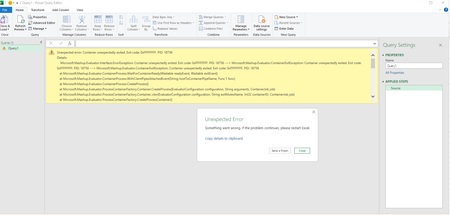
I've been facing this issue in the power query editor. Kindly help me in this. I've already done an online repair but it didn't solve the issue.

JKPieterse
Aug 27, 2026Silver Contributor
This sounds a lot like an issue with the installation of Power Query, or an issue where an add-in is interfering.
I would do these in order (at each step starting from 4, repeat steps 1-3):
- New blank workbook.
- Enter a tiny table
- On the Data tab, click "From Table/Range"
- If it crashes again:
- Start Excel in Safe Mode (close Excel first. Then hold down the Control key while Excel starts).
- If it still crashes:
- Disable all COM add-ins:
File, Options, Add-ins, at the bottom choose COM add-ins in the drop-down and click the Go... button. Uncheck all of them after noting which were checked
- Disable all COM add-ins:
- If it still crashes:
- Clear Power Query cache:
Open Windows Explorer and paste this into the address bar: %LOCALAPPDATA%\Microsoft\Office\16.0\PowerQuery
and press Enter. Delete the content of that folder (or to be on the safer side, rename the folder itself so PowerQuery can rename it)
- Clear Power Query cache:
- If that doesn't help, do an Office Quick Repair using Office setup from settings, Software
- If that doesn't help, do an Office Online Repair using Office setup from settings, Software