Forum Discussion

HELP: Leaving a cell blank when another cell has a formula not yet calculated
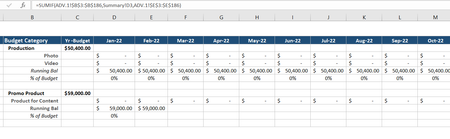

JoeUser2004 this did not solve the problem. I am attaching the spreadsheet for reference. I need columns D - O, rows 8, 9, 13,14 to be blank until there are values in rows 6 or 7. Currently I have formulas in rows 6 & 7.
https://cisnerosgrp-my.sharepoint.com/:x:/g/personal/rosariod_mwcompany_com/EYg0iakbvqtOpEaiKK1RoJgB7JIDjXNGgsUFuxhzVfH5aQ?e=srSCAD

Rosiid wrote: ``I need columns D - O, rows 8, 9, 13,14 to be blank until there are values in rows 6 or 7. Currently I have formulas in rows 6 & 7.``
Thank you for providing the Excel file. Unfortunately, I do not understand what you are trying to do.
In particular, I do not understand the distinction you are trying to make by saying "until there are values in rows 6 or 7".
As you note, you have formulas in rows 6 and 7 that always return a numeric value.
I can only imagine (wild guess) that you want to treat zeros as "not a value". The zero value appears as a dash ("-") because of the Accounting format. In that case, your formulas might be:
D8: =IF(D6*D7=0, 0, SUM($C$5)-SUM(D6:D7))
D9: =IF(D6*D7=0, "", =SUM(D6:D7)/$C$5)
D13: =IF(D12=0, 0, C11-D12)
D14: =IF(D12=0, "", D13/$C$11)
You do not have a formula in D14. So my formula above is wild speculation.
The expression D6*D7=0 is a tricky way of saying OR(D6=0,D7=0). That is, D6*D7 is zero if either value is zero.
The formulas in D9 and D14 return the null string ("") because I assume that you do not want to see 0%. If 0% is acceptable, no change is needed to D9 and presumably to D14.
OTOH, if you would like to see a dash, you can use your original formula in D9, but with the following Custom format: [=0]"-"; 0%
Be that as it may, it looks like Riny_van_Eekelen has jumped in to help. Follow his lead, since I do not have the patience to contribute further.