Forum Discussion

HELP: Leaving a cell blank when another cell has a formula not yet calculated

Ostensibly, you might write:
=IF(D11="", "", C10-D11)
or
=IF(AND(D11<>"",C10<>""), C10-D11, "")
Note that those formula do __not__ "leave the cell blank" per se. They make the cell __appear__ blank.
In fact, they contain a value when they appear blank, namely the null string (text). Consequently, it might be tricky to reference them in some arithmetic expressions. Also, ISBLANK would return FALSE because that function really tests for __empty__ cells; that is, cells with no value.
However, your description is confusing because if D11 contains that SUMIF formula, there is always a value in D11. It might be zero.
So if the formulas above do not solve your problem, or they create new ones that you cannot solve yourself, attach an Excel file, not a screen image. See the "browse" link at the bottom of the reply pane.
If you not see the link (I'm told that some users do not), upload the Excel file to a file-sharing website, and post the public download URL. I like box.net/files; others like dropbox.com.

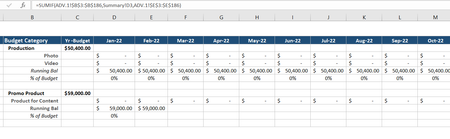
JoeUser2004 this did not solve the problem. I am attaching the spreadsheet for reference. I need columns D - O, rows 8, 9, 13,14 to be blank until there are values in rows 6 or 7. Currently I have formulas in rows 6 & 7.
https://cisnerosgrp-my.sharepoint.com/:x:/g/personal/rosariod_mwcompany_com/EYg0iakbvqtOpEaiKK1RoJgB7JIDjXNGgsUFuxhzVfH5aQ?e=srSCAD
- JoeUser2004Jan 24, 2022Bronze Contributor
Rosiid wrote: ``I need columns D - O, rows 8, 9, 13,14 to be blank until there are values in rows 6 or 7. Currently I have formulas in rows 6 & 7.``
Thank you for providing the Excel file. Unfortunately, I do not understand what you are trying to do.
In particular, I do not understand the distinction you are trying to make by saying "until there are values in rows 6 or 7".
As you note, you have formulas in rows 6 and 7 that always return a numeric value.
I can only imagine (wild guess) that you want to treat zeros as "not a value". The zero value appears as a dash ("-") because of the Accounting format. In that case, your formulas might be:
D8: =IF(D6*D7=0, 0, SUM($C$5)-SUM(D6:D7))
D9: =IF(D6*D7=0, "", =SUM(D6:D7)/$C$5)
D13: =IF(D12=0, 0, C11-D12)
D14: =IF(D12=0, "", D13/$C$11)
You do not have a formula in D14. So my formula above is wild speculation.
The expression D6*D7=0 is a tricky way of saying OR(D6=0,D7=0). That is, D6*D7 is zero if either value is zero.
The formulas in D9 and D14 return the null string ("") because I assume that you do not want to see 0%. If 0% is acceptable, no change is needed to D9 and presumably to D14.
OTOH, if you would like to see a dash, you can use your original formula in D9, but with the following Custom format: [=0]"-"; 0%
Be that as it may, it looks like Riny_van_Eekelen has jumped in to help. Follow his lead, since I do not have the patience to contribute further.
- Riny_van_EekelenJan 23, 2022Platinum Contributor
Rosiid Have slightly changed the set-up of the schedule and changed the formulae in rows 8 and 9, trusting that you can do the rest yourself, following the same principles. Added some data in ADV.1 to test.
- JoeUser2004Jan 24, 2022Bronze Contributor
Riny_van_Eekelen .... For your edification, there is no reason to use double-negate ("--") in expressions like =($C$8-SUM($C$6:D7))*--(SUM(D6:D7)<>0) in D8.
I know that your intent is to coerce TRUE and FALSE into 1 and 0.
But there is nothing special about double-negation for that purpose. __Any__ arithmetic operation accomplishes that. Double-negation is simply "one" (really two) arithmetic operation(s).
Likewise, the multiplication suffices as __one__ arithmetic operation. So, you can write simply =($C$8-SUM($C$6:D7))*(SUM(D6:D7)<>0) .
-----
But it is probably more efficient, albeit not as terse, to write
IF(SUM(D6:D7)<>0, $C$8-SUM($C$6:D7), 0) .
The IF operation is not a true function. It does not evaluate all of its "parameters", then "call" an internal IF "function". Instead, it evaluates the "parameters" left-to-right, stopping when the first "true" expression is evaluated. In effect, the IF "function" is an __operator__ that has the __form__ of a function.
(FYI, that is __not__ true of the new IFS function. Sigh.)
- RosiidMar 04, 2022Copper Contributor
JoeUser2004Thank you all so much, this really helped!
- RosiidJan 23, 2022Copper ContributorThank you so much! I will test it out in the morning.
