Forum Discussion

sheri_021
May 01, 2022Copper Contributor
help in excel
here's image 1 with code matching different SKU. let's say this is file A I need copy and past file A's code into file B. However file B is looking different when I paste file A's cod...
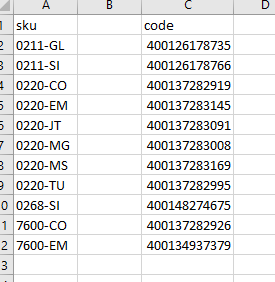
 May 01, 2022
Does my response at https://answers.microsoft.com/en-us/msoffice/forum/all/is-there-any-way-to-make-this-autofill-please-help/6acf9d92-988f-4547-b733-89b307b515be solve your problem?
JoeUser2004
May 01, 2022Bronze Contributor
Does my response at https://answers.microsoft.com/en-us/msoffice/forum/all/is-there-any-way-to-make-this-autofill-please-help/6acf9d92-988f-4547-b733-89b307b515be solve your problem?

sheri_021
May 02, 2022Copper Contributor
actually I change your equation like below for 2nd row
More generally (allows column B data to be text or numeric):
=IF(OR(A2="",A2=A1),"", INDEX(B$2:B2, SUMPRODUCT(--(C$1:C1<>""))))
Change to :=IF(OR(A2="",A2=A1),"", INDEX(B$3:B2, SUMPRODUCT(--(C$1:C1<>""))))
then rest of them fill correctly.
I don't understand why, I was just give it try and play around. I don't know how to fix to make it correctly auto fill from row 1
More generally (allows column B data to be text or numeric):
=IF(OR(A2="",A2=A1),"", INDEX(B$2:B2, SUMPRODUCT(--(C$1:C1<>""))))
Change to :=IF(OR(A2="",A2=A1),"", INDEX(B$3:B2, SUMPRODUCT(--(C$1:C1<>""))))
then rest of them fill correctly.
I don't understand why, I was just give it try and play around. I don't know how to fix to make it correctly auto fill from row 1