Forum Discussion

pevans1350
May 01, 2024Copper Contributor
Help! Image disappears when you click on it in Excel, with the message "Picture" appearing instead
Hi. I have a spreadsheet with 200 rows that contains one image in each row of column A. I inserted these images by Insert > Picture > Place Over Cell (then I rotated it as neccessary) > then I cl...

particle16
Aug 09, 2024Copper Contributor
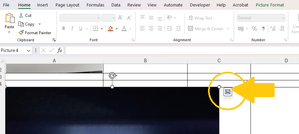
The picture icon at the corner of the image stopped working for me. Instead try right clicking on the image and selecting Picture in Cell ---> Place Over Cell from the menu. This will move the picture out and make it visible again. I would then click on the icon at the corner of the picture to place it back in the cell. Annoying, but it works.

CJ_McCollough
Oct 24, 2024Copper Contributor
particle16 Thanks- this may work for some people but it is not an option for a large list that needs to be filtered. (I have approx 1500 icons.) If you ever figure out a different way. Please let me know.